一文搞懂 Spring AI Alibaba Graph:状态驱动的 AI Agent 编排引擎



面向具备 Java 基础、了解 Spring Boot、想入门 AI Agent 编排的开发者
一句话概述:Graph 是 Spring AI Alibaba 的节点编排引擎,通过状态驱动的图执行模型,让 AI Agent 的复杂业务流程清晰、可维护、可扩展。
前置依赖
| 依赖 |
版本 |
用途 |
spring-boot-starter |
3.x |
基础框架 |
spring-ai-alibaba-starter-graph-core |
1.1.2.0 |
核心图引擎 |
spring-ai-alibaba-starter |
1.1.2.0 |
ChatClient(LLM 调用) |
总览:Graph 核心概念一览
| 概念 |
类型 |
职责 |
关键方法 |
| OverAllState |
状态 |
节点间通信的唯一媒介 |
state.value(key, default) |
| NodeAction |
接口 |
节点执行逻辑 |
apply(state) → Map<String, Object> |
| EdgeAction |
接口 |
条件边路由决策 |
apply(state) → String |
| KeyStrategyFactory |
工厂 |
字段合并策略登记 |
返回 Map<key, KeyStrategy> |
| StateGraph |
装配器 |
注册节点和边 |
addNode(), addEdge() |
| CompiledGraph |
执行器 |
图编译产物,执行入口 |
fluxStream() |
1. 快速入门:用 ReAct 模式跑通第一个 Agent
这一节用一个最简单的例子,让你 5 分钟理解 Graph 是怎么工作的。
1.1 什么是 ReAct?
ReAct 是 AI Agent 最经典的范式之一,核心思想是:思考 → 行动 → 观察 → 循环。
1
2
3
4
5
6
7
8
9
| 用户提问
↓
思考(Thought):分析问题,决定下一步做什么
↓
行动(Action):调用工具或 API
↓
观察(Observation):获取结果
↓
继续思考或结束
|
1.2 用 Graph 实现一个简易 ReAct Agent
Step 1: 定义状态字段
1
2
3
4
5
6
7
8
9
10
11
12
13
14
15
16
17
18
| public final class GraphStateKeys {
public static final String QUERY = "query";
public static final String THOUGHT = "thought";
public static final String ACTION = "action";
public static final String OBSERVATION = "observation";
public static final String FINAL_ANSWER = "final_answer";
public static final String THINK_NEXT_NODE = "think_next_node";
public static final String[] ALL_KEYS = {
QUERY, THOUGHT, ACTION, OBSERVATION, FINAL_ANSWER, THINK_NEXT_NODE
};
}
|
Step 2: 定义 Think 节点(思考 + 决策)
1
2
3
4
5
6
7
8
9
10
11
12
13
14
15
16
17
18
19
20
21
22
23
24
25
26
27
28
29
30
31
32
33
| @Component
public class ThinkNode implements NodeAction {
private final ChatClient chatClient;
public ThinkNode(ChatClient chatClient) {
this.chatClient = chatClient;
}
@Override
public Map<String, Object> apply(OverAllState state) throws Exception {
Map<String, Object> updated = new HashMap<>();
String query = state.value(GraphStateKeys.QUERY, "");
String history = state.value(GraphStateKeys.OBSERVATION, "");
String thinkResult = chatClient.prompt()
.system("你是一个 ReAct Agent。对于用户问题,分析是否需要调用工具。"
+ "只返回 JSON 格式:{\"thought\": \"分析...\", \"action\": \"search\" 或 \"finish\", \"answer\": \"如果 finish,给出答案\"}")
.user("问题:" + query + "\n历史结果:" + history)
.call()
.content();
boolean shouldFinish = thinkResult.contains("\"action\"") && thinkResult.contains("finish");
String nextNode = shouldFinish ? "response" : "action";
updated.put(GraphStateKeys.THOUGHT, thinkResult);
updated.put(GraphStateKeys.THINK_NEXT_NODE, nextNode);
return updated;
}
}
|
Step 3: 定义 Action 节点(执行行动)
1
2
3
4
5
6
7
8
9
10
11
12
13
14
15
16
17
18
19
20
21
22
23
24
| @Component
public class ActionNode implements NodeAction {
private final ChatClient chatClient;
public ActionNode(ChatClient chatClient) {
this.chatClient = chatClient;
}
@Override
public Map<String, Object> apply(OverAllState state) throws Exception {
Map<String, Object> updated = new HashMap<>();
String thought = state.value(GraphStateKeys.THOUGHT, "");
String observation = "【模拟工具调用】根据思考 \"" + thought + "\" 执行了搜索";
updated.put(GraphStateKeys.OBSERVATION, observation);
updated.put(GraphStateKeys.THINK_NEXT_NODE, "think");
return updated;
}
}
|
Step 4: 定义 Response 节点(返回结果)
1
2
3
4
5
6
7
8
9
10
11
12
| @Component
public class ResponseNode implements NodeAction {
@Override
public Map<String, Object> apply(OverAllState state) throws Exception {
Map<String, Object> updated = new HashMap<>();
String thought = state.value(GraphStateKeys.THOUGHT, "");
updated.put(GraphStateKeys.FINAL_ANSWER, "处理完成");
return updated;
}
}
|
Step 5: 定义 Dispatcher(只负责传话)
1
2
3
4
5
6
7
8
| @Component
public class ThinkDispatcher implements EdgeAction {
@Override
public String apply(OverAllState state) throws Exception {
return (String) state.value(GraphStateKeys.THINK_NEXT_NODE, "think");
}
}
|
Step 6: 装配图
1
2
3
4
5
6
7
8
9
10
11
12
13
14
15
16
17
18
19
20
21
22
23
24
25
26
| @Bean
public StateGraph reactGraph(
KeyStrategyFactory keyStrategyFactory,
ThinkNode thinkNode,
ActionNode actionNode,
ResponseNode responseNode
) throws GraphStateException {
return new StateGraph("react_agent", keyStrategyFactory)
.addNode("think", node_async(thinkNode))
.addNode("action", node_async(actionNode))
.addNode("response", node_async(responseNode))
.addEdge(START, "think")
.addEdge("response", END)
.addConditionalEdges("think",
edge_async(new ThinkDispatcher()),
Map.of("action", "action", "response", "response"))
.addEdge("action", "think");
}
|
Step 7: 调用执行
1
2
3
4
5
6
7
8
9
10
11
12
13
14
15
16
17
18
19
20
21
22
23
24
25
26
27
| @RestController
public class ReactController {
private final CompiledGraph compiledGraph;
public ReactController(@Qualifier("reactGraph") StateGraph stateGraph)
throws GraphStateException {
this.compiledGraph = stateGraph.compile(CompileConfig.builder()
.saverConfig(SaverConfig.builder()
.register("memory", new MemorySaver())
.build())
.build());
}
@GetMapping("/chat")
public Flux<NodeOutput> chat(@RequestParam String query,
@RequestParam String threadId) {
Map<String, Object> input = new HashMap<>();
input.put(GraphStateKeys.QUERY, query);
RunnableConfig config = RunnableConfig.builder()
.threadId(threadId)
.build();
return compiledGraph.fluxStream(input, config);
}
}
|
1.3 这个例子跑起来是什么效果?
请求: /chat?query=今天天气怎么样&threadId=user-001
执行流程图:
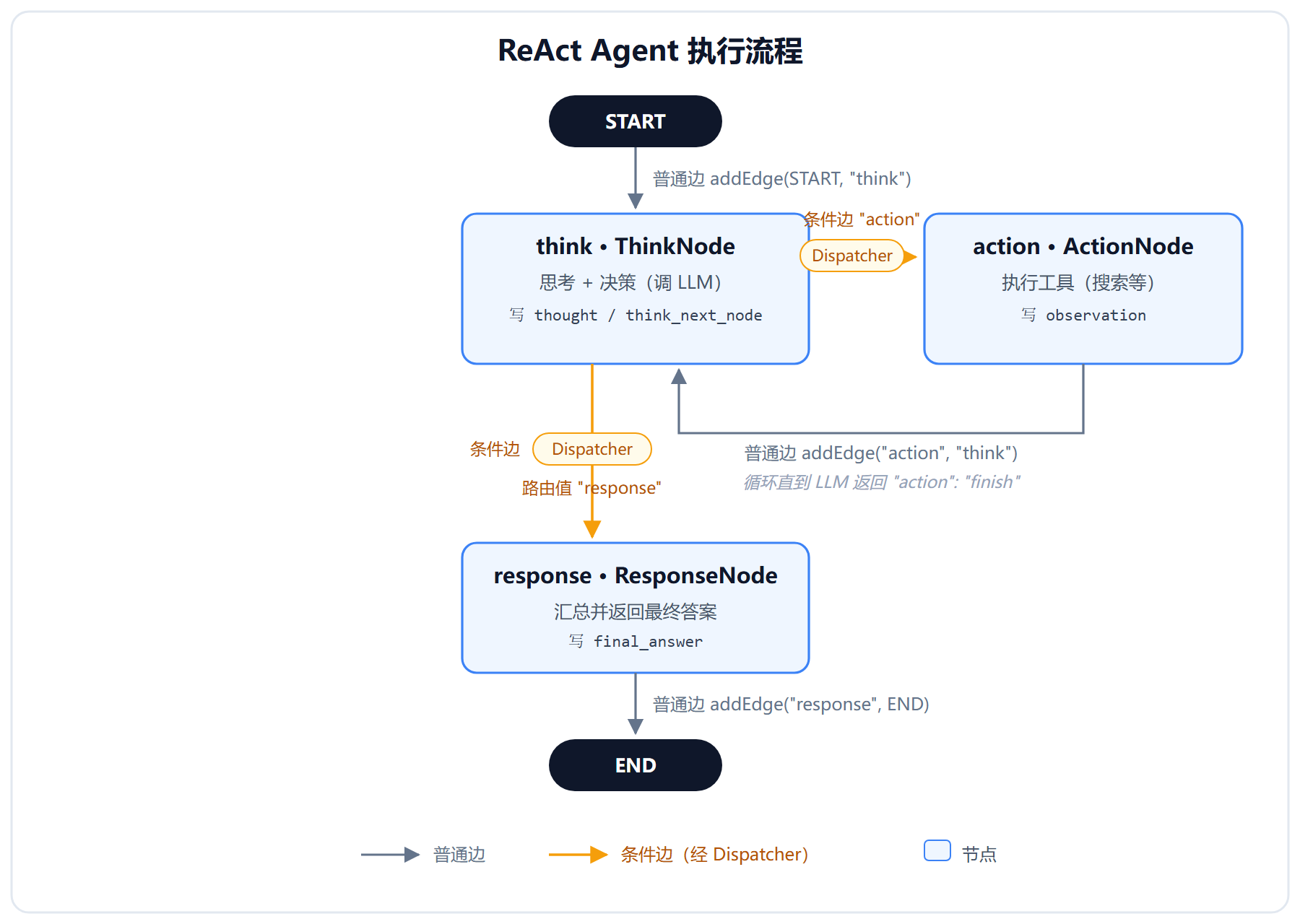
循环直到 LLM 说 "action": "finish"
实际执行可能是:
| 轮次 |
执行路径 |
| 第1轮 |
think(思考) → action(搜索天气) → think(分析结果) |
| 第2轮 |
think(思考) → action(获取更多细节) → think(分析结果) |
| 第3轮 |
think(思考) → response(给出答案) → END |
1.4 快速入门小结
| 概念 |
在这个例子里 |
| Node |
ThinkNode、ActionNode、ResponseNode |
| Dispatcher |
ThinkDispatcher(读 think_next_node,决定去哪) |
| Edge |
普通边(action→think)、条件边(think→action/response) |
| State |
query、thought、observation、final_answer |
| KeyStrategyFactory |
告诉引擎每个字段怎么合并 |
2. 核心概念详解
2.1 心智模型:Graph 执行循环
1
2
3
4
5
6
7
8
9
10
11
12
| ┌─────────────────────────────────────────────────────────────┐
│ Graph 引擎执行循环 │
│ │
│ 1. 当前节点调用 apply(state) → 返回 Map │
│ 2. 引擎按 KeyStrategy 把 Map【合并】进 state │
│ 3. 引擎查节点的出边类型: │
│ ├─ 普通边:直接取目标节点(无需判断) │
│ └─ 条件边:调用 EdgeAction.apply(state) → 路由值 │
│ → 用路由值查路由表 → 得到目标节点 │
│ 4. 跳到目标节点,回到步骤 1 │
│ 5. 直到命中 END │
└─────────────────────────────────────────────────────────────┘
|
三个关键推论:
- state 是唯一真相 — 节点之间不互相调用、不互相传参,只通过 state 通信
- 合并在判断之前 — 节点的返回值先合并进 state,dispatcher 才能看到
- 节点决定去哪,dispatcher 只负责传话
2.2 状态模型:OverAllState
为什么用 Map 而非对象?
不同节点写入不同字段,如果用对象风格,所有节点都要 import 整个 state 类,耦合会炸裂。Map 风格的"partial update"天然契合图的执行语义。
1
2
3
4
5
6
7
8
9
10
11
|
String query = state.value("query", "");
Integer count = state.value("count", 0);
public Map<String, Object> apply(OverAllState state) {
Map<String, Object> updated = new HashMap<>();
updated.put("result", "分析报告已完成");
updated.put("next_node", "reporter");
return updated;
}
|
2.3 字段合并策略:KeyStrategyFactory
1
2
3
4
5
6
7
8
9
10
| @Bean
public KeyStrategyFactory keyStrategyFactory() {
return () -> {
Map<String, KeyStrategy> strategies = new HashMap<>();
for (String key : GraphStateKeys.ALL_KEYS) {
strategies.put(key, new ReplaceStrategy());
}
return strategies;
};
}
|
3. 节点与边
3.1 节点:NodeAction
1
2
3
4
5
6
7
|
public interface NodeAction {
Map<String, Object> apply(OverAllState state) throws Exception;
}
.addNode("planner", node_async(new PlannerNode(chatClient)))
|
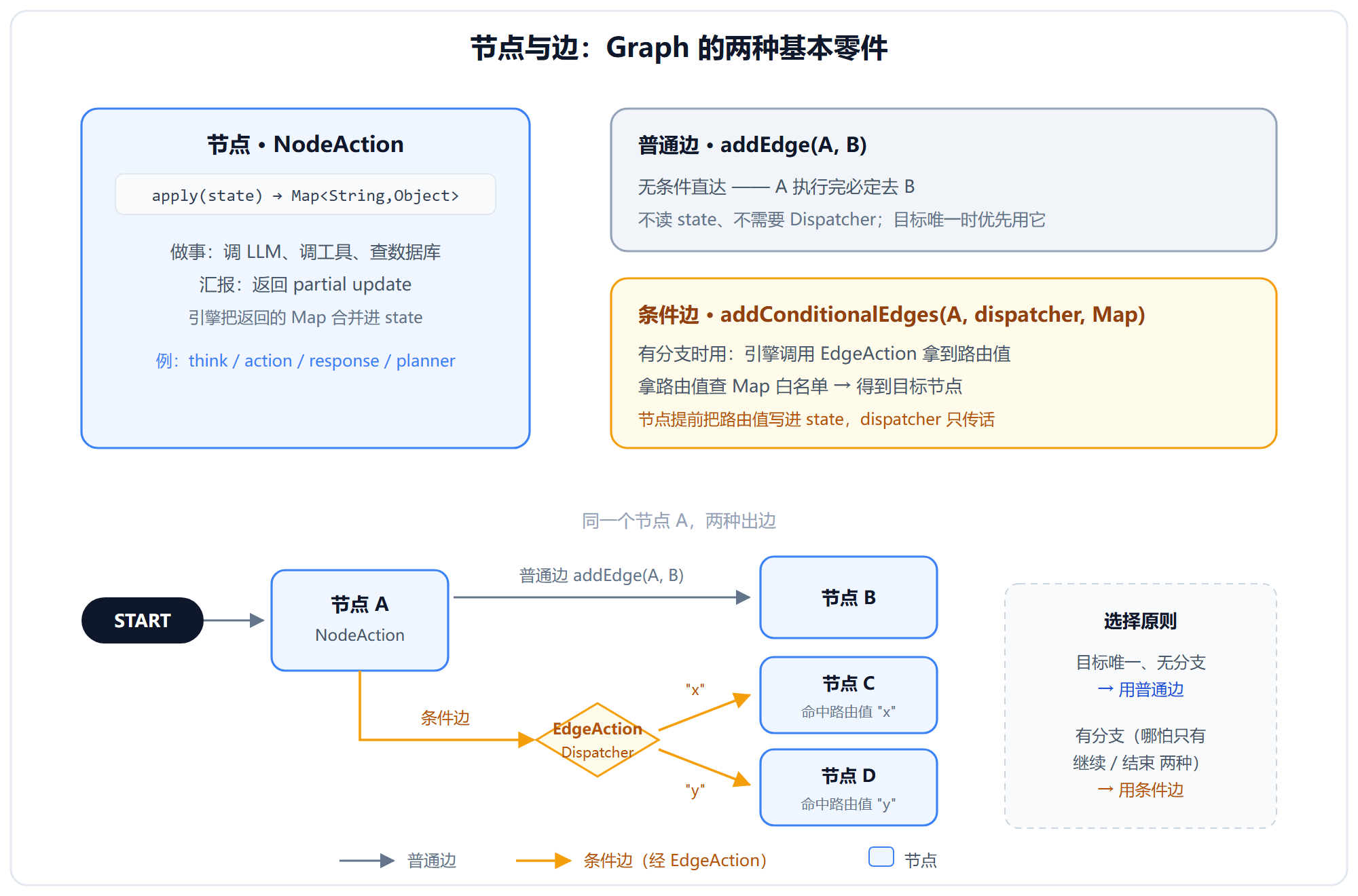
3.2 边:普通边 vs 条件边
| 类型 |
代码 |
是否读 state |
是否需要 Dispatcher |
| 普通边 |
addEdge("a", "b") |
❌ |
❌ |
| 条件边 |
addConditionalEdges("a", dispatcher, Map) |
✅ |
✅ |
选择原则:
- 目标唯一、无分支 →
addEdge(性能更好)
- 有分支(哪怕只有"继续/结束") →
addConditionalEdges
3.3 节点与边的关系图
4. Dispatcher:拓扑与数据的翻译器
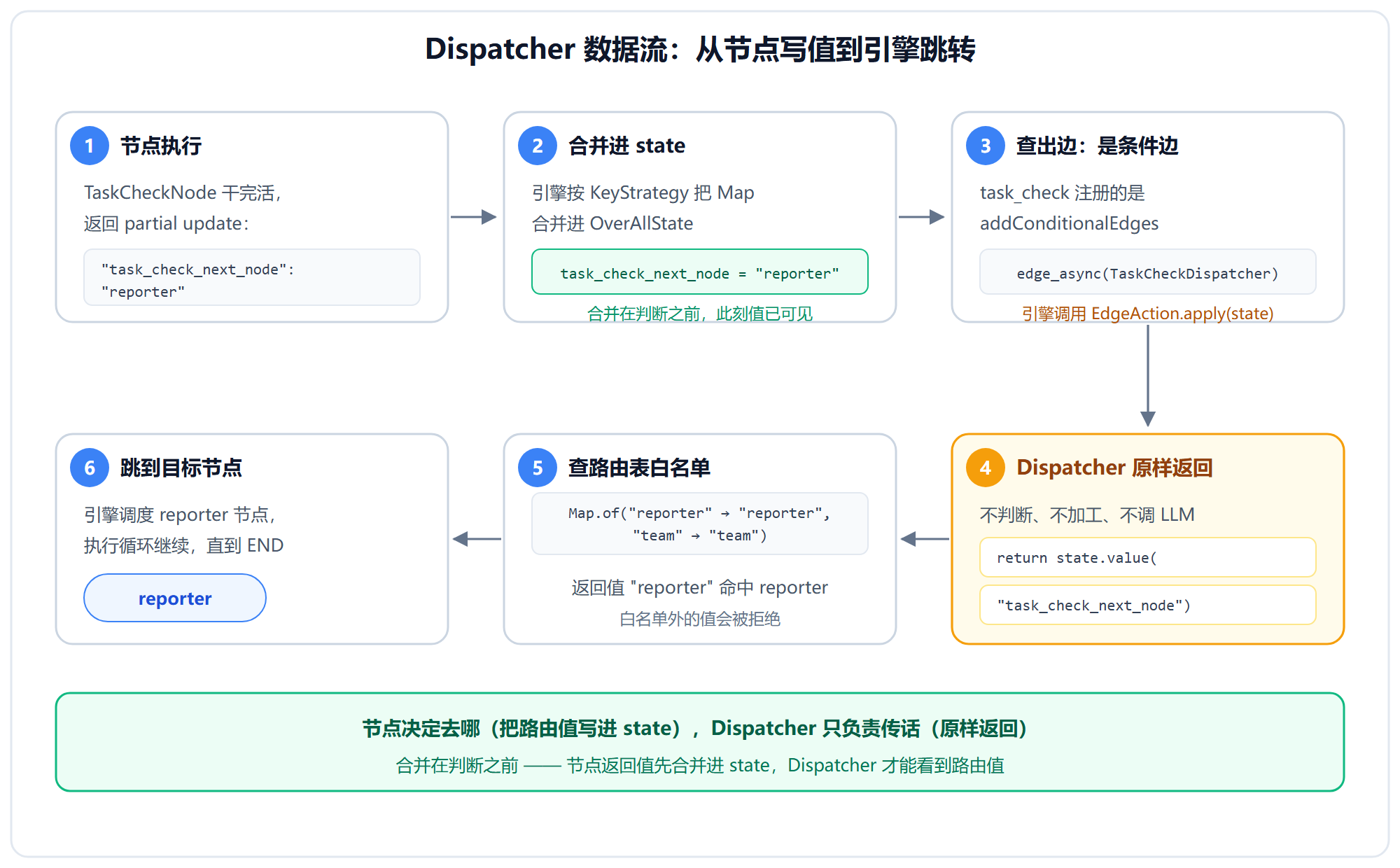
4.1 Dispatcher 的真实角色
Dispatcher 是个没有脑子的转发器。它不读业务数据、不做判断、不调 LLM,只做一件事:把节点刚才写进 state 的那个字符串,原样交给引擎。
1
2
3
4
5
6
7
| public class TaskCheckDispatcher implements EdgeAction {
@Override
public String apply(OverAllState state) throws Exception {
return (String) state.value("task_check_next_node", END);
}
}
|
4.2 完整数据流图
4.3 为什么 key 要带节点名前缀?
1
2
3
4
5
|
updated.put("task_check_next_node", allDone ? "reporter" : "team");
updated.put("reflection_next_node", passed ? "response" : "replan");
|
两个节点同时跑,各自的路由值互不干扰。 如果框架约定统一 key(都叫 __next_node__),那节点 A 写进去、节点 B 又覆盖,路由就乱了。
4.4 为什么 LLM 判断写在节点里?
| 原因 |
说明 |
| 配置依赖 |
Dispatcher 由 new XxxDispatcher() 无参构造,拿不到 ChatClient |
| 流式输出 |
节点里的 LLM 可以 .stream() 把 token 实时推给前端 |
| 职责分离 |
节点 = "做事 + 汇报",dispatcher = "传话" |
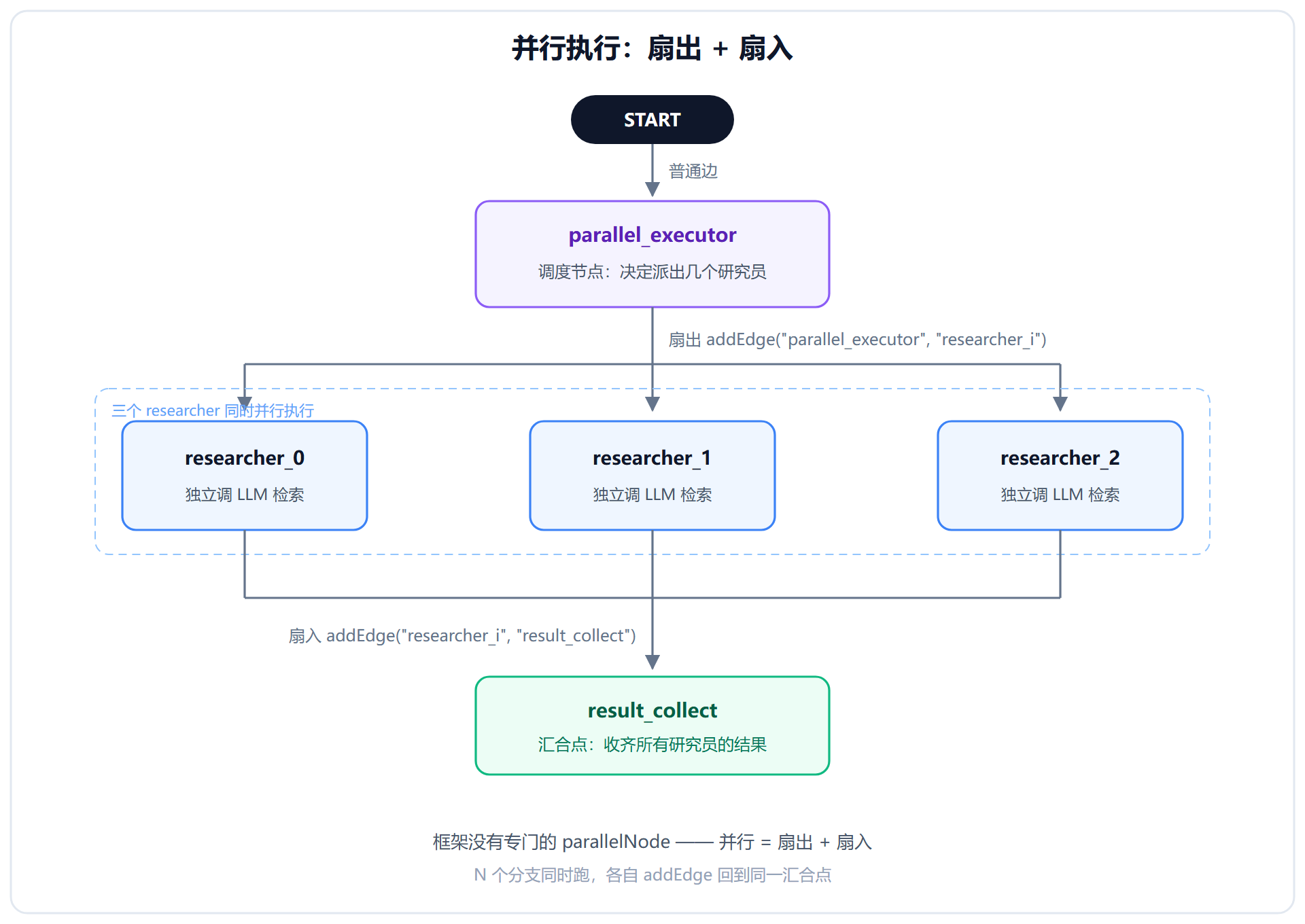
5. 并行执行:扇出扇入模式
框架没有专门的 parallelNode,并行通过"扇出 + 扇入"实现:
1
2
3
4
5
6
7
|
for (int i = 0; i < N; i++) {
String nodeId = "researcher_" + i;
stateGraph.addNode(nodeId, node_async(new ResearcherNode(...)));
stateGraph.addEdge("parallel_executor", nodeId);
stateGraph.addEdge(nodeId, "result_collect");
}
|
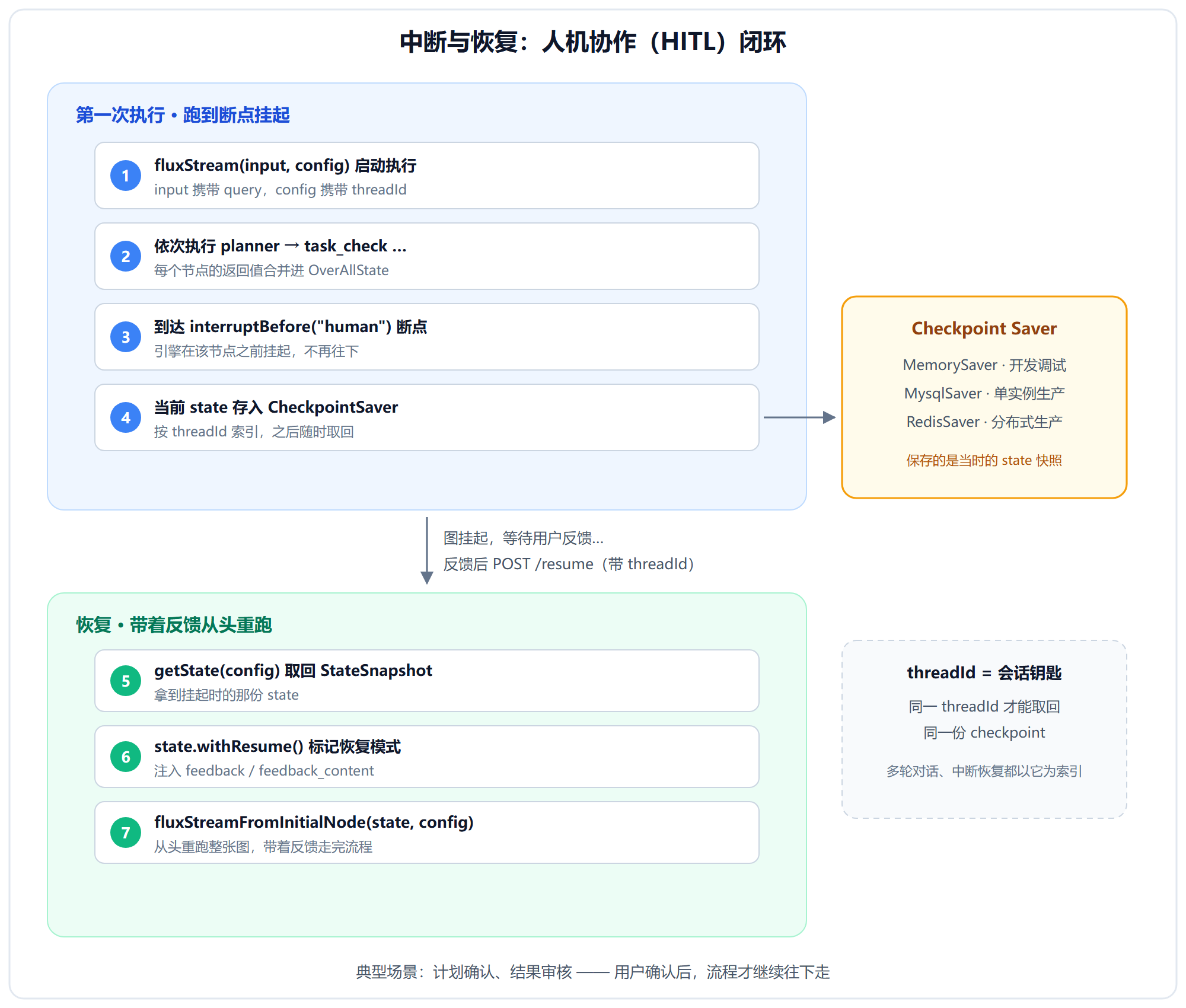
6. 持久化与恢复:多轮对话的钥匙
6.1 Checkpoint Saver
| 类型 |
用途 |
特点 |
MemorySaver |
开发调试 |
内存存储,重启丢失 |
MysqlSaver |
单实例生产 |
MySQL 持久化 |
RedisSaver |
分布式生产 |
Redis 持久化 |
6.2 中断与恢复流程图
6.3 中断恢复代码
1
2
3
4
5
6
7
8
9
10
11
12
13
14
15
16
17
18
19
20
21
22
| @PostMapping("/resume")
public Flux<String> resume(@RequestBody FeedbackRequest req) {
RunnableConfig config = RunnableConfig.builder()
.threadId(req.threadId())
.build();
StateSnapshot snapshot = compiledGraph.getState(config);
OverAllState state = snapshot.state();
state.withResume();
Map<String, Object> feedback = new HashMap<>();
feedback.put("feedback", req.accepted());
feedback.put("feedback_content", req.feedbackContent());
state.withHumanFeedback(new OverAllState.HumanFeedback(feedback, "response"));
return compiledGraph.fluxStreamFromInitialNode(state, config);
}
|
7. 完整装配示例
1
2
3
4
5
6
7
8
9
10
11
12
13
14
15
16
17
18
19
20
21
22
23
24
25
26
27
28
29
30
31
32
33
34
35
36
37
38
39
40
41
42
43
44
45
46
47
48
49
50
51
52
53
54
55
| @Configuration
public class ErpGraphConfig {
@Bean
public KeyStrategyFactory keyStrategyFactory() {
return () -> {
Map<String, KeyStrategy> strategies = new HashMap<>();
for (String key : GraphStateKeys.ALL_KEYS) {
strategies.put(key, new ReplaceStrategy());
}
return strategies;
};
}
@Bean
public StateGraph erpGraph(
KeyStrategyFactory keyStrategyFactory,
PlannerNode plannerNode,
TaskCheckNode taskCheckNode,
ReporterNode reporterNode,
ReflectionNode reflectionNode
) throws GraphStateException {
return new StateGraph("erp_agent", keyStrategyFactory)
.addNode("planner", node_async(plannerNode))
.addNode("task_check", node_async(taskCheckNode))
.addNode("reporter", node_async(reporterNode))
.addNode("reflection", node_async(reflectionNode))
.addEdge(START, "planner")
.addEdge("planner", "task_check")
.addConditionalEdges("task_check",
edge_async(new TaskCheckDispatcher()),
Map.of("reporter", "reporter", "team", "team"))
.addEdge("reporter", "reflection")
.addConditionalEdges("reflection",
edge_async(new ReflectionDispatcher()),
Map.of("response", "response", "replan", "replan"))
.addEdge("response", END);
}
@Bean
public CompiledGraph erpCompiledGraph(StateGraph erpGraph) {
return erpGraph.compile(CompileConfig.builder()
.saverConfig(SaverConfig.builder()
.register("memory", new MemorySaver())
.build())
.interruptBefore("human")
.build());
}
}
|
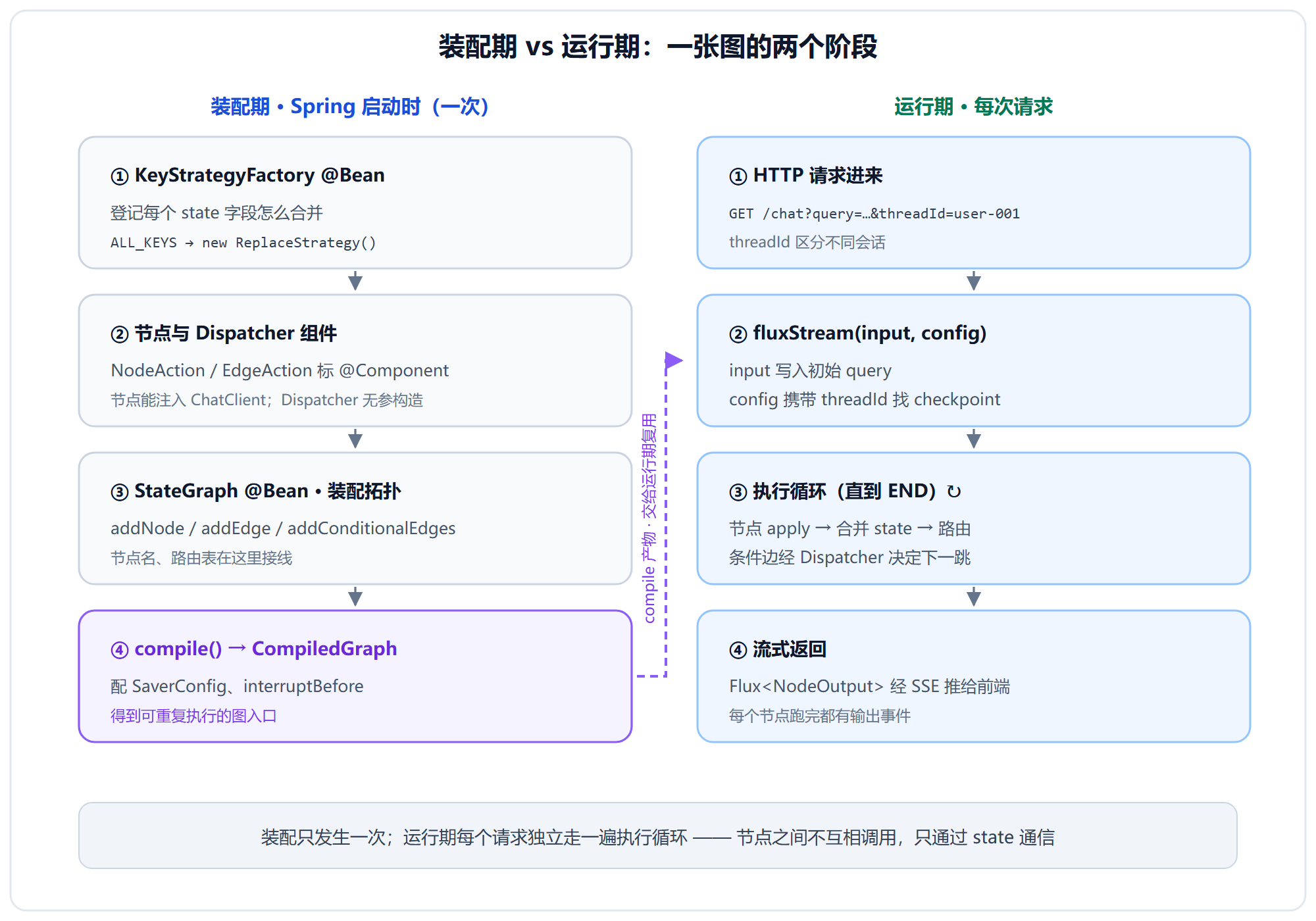
8. 协作关系总览图
9. 常见坑与最佳实践
| 坑 |
说明 |
解决方案 |
| 节点返回未注册的 key |
引擎抛 KeyNotFoundException |
用常量数组批量注册 ALL_KEYS |
| 节点名拼错 |
路由表查不到,运行时抛异常 |
用常量而非字面量 |
| 依赖 ThreadLocal |
节点在线程池里跑,拿不到上下文 |
把 userId 显式放进 state |
| 节点里用共享可变成员变量 |
并行节点会互相踩 |
节点应该是无状态的,数据只走 state |
| state 字段塞大对象 |
每个 checkpoint 都要序列化 |
大字段委托给单独服务存储 |
忘记 interruptBefore |
HITL 节点不会挂起 |
在 CompileConfig 里配置 |
10. 速查表
| API |
作用 |
备注 |
OverAllState |
Map 式全局状态 |
节点间唯一通信方式 |
KeyStrategyFactory |
登记每个 key 的合并策略 |
穷尽注册,漏了会抛异常 |
ReplaceStrategy |
覆盖旧值 |
三个项目只用这一种 |
NodeAction |
同步节点接口 apply(state) → Map |
你只用实现这个 |
node_async(nodeAction) |
同步包异步 |
装配时用 |
EdgeAction |
同步条件边 apply(state) → String |
你只用实现这个 |
StateGraph.addNode |
注册节点 |
返回 this,可链式 |
StateGraph.addEdge |
普通边(无条件) |
addEdge(A, B) |
addConditionalEdges |
条件边 + 路由表白名单 |
Map<返回值, 目标节点> |
CompiledGraph.compile |
编译图 |
在这里配 interruptBefore |
RunnableConfig.threadId |
会话/checkpoint 索引 |
多轮对话的钥匙 |
MemorySaver |
内存 checkpoint |
开发调试用 |
fluxStream(input, config) |
流式执行图 |
SSE 入口 |
getState(config) |
取最近 checkpoint |
恢复时用 |
state.withResume() |
标记恢复模式 |
恢复时必调 |
许可
MIT © 2026